
DAILY OPERATIONS
Run the service company, not only the chemistry.
Field reports, inventory, visits, territory, calculators, and the handshake with your customer — the work that happens between samples. AquaAdvisor is the operating system for the day at a water treatment service company.


AquaAdvisor is the system of record for what happened on the account today — reports, inventory, visits, and the handshake with the plant — not a portal that only charts conductivity.
REP DASHBOARD
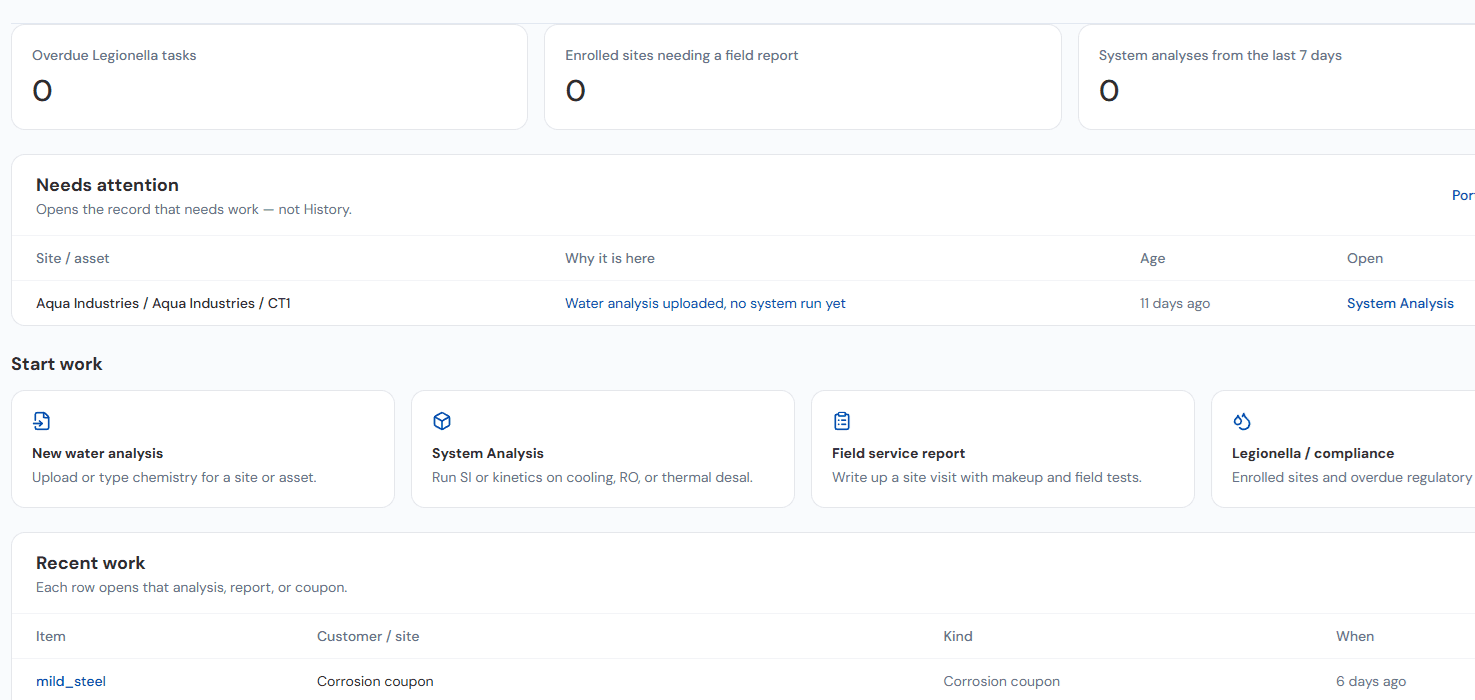
Every rep starts the day with what needs attention
Not a blank inbox. The dashboard shows what is overdue, what is waiting, and where to start.
Counters
Overdue Legionella tasks, enrolled sites needing a field report, and system analyses this week.
Needs attention
Each row opens the record that needs work, with the reason and how long it has waited.
Start work
New water analysis, System Analysis, field service report, or Legionella task in one click.
Recent work and portfolio view
Recent analyses, reports, and coupons, plus a portfolio heatmap for branch and district managers.
FIELD SERVICE REPORTS
Full field service report support
From upload to a sent, branded engineering report in about 6–10 minutes (estimate), the same standard from every rep.
Image in, formatted report out
Upload an image of field-test results. AquaAdvisor organizes the data, interprets it, and creates the formatted service report — including digital signing and optional customer acknowledgement.
Trends and risk on the same page
Advanced APIs incorporate trends and risk analysis for deposition, corrosion, and microbiological conditions — not a table of readings with no engineering context.
AI-suggested comments you control
Suggested written comments are offered for inclusion. The chemist decides what goes in the report.
Send once, use many times
Email as a PDF or a live report to connected users, write the visit into telemetry, send to your CRM, and keep the same record for the QBR.
FIELD SERVICE REPORTS · TIME
From upload to sent report in about 6–10 minutes
EstimateUpload field data
1–2 minPhoto of the test sheet, Excel, PDF, or typed entry
Extract and map
1–2 minValues read and mapped to the asset and its control limits; rep confirms
Calculate
SecondsSaturation, deposition, corrosion, and inventory run-out
Review actions
3–5 minRep edits or accepts recommended actions and comments
Format and store
AutomaticBranded PDF and live report saved to the asset history
Send
Under 1 minTo the contacts set to receive field service reports
- Typical manual workflow50–75 min
- AquaAdvisor6–10 min
Manual: transcribe tests, spreadsheet calculations, write recommendations, format, file, and email.
7–11 hours
returned to each rep every week at 10 reports a week
Estimates for one cooling tower report, not a measured study. We will publish measured medians as field data accumulates.
DATA INTAKE
Upload anything. It lands on the right asset.
- Photos of test kits and sheets
- Corrosion coupon photos
- Excel and CSV
- PDF lab reports
- Exchanger data sheets
- Historian and telemetry feeds
- Typed field entries
Read
Values, units, and dates extracted
Map
Matched to customer, site, unit, and asset
Check
Compared with control limits; gaps flagged
Store
Saved with the original file attached
- Field service reports
- System Analysis and twins
- Trends and dashboards
- Mike, the AI technical consultant
- CRM and ERP via API
WHAT IT ACTUALLY DOES
The work between samples
Chemistry is the floor. The service day is visits, evidence, inventory, and accountability — captured once, used by field, branch, and the customer.
Field service reports
Upload field-test images. AquaAdvisor organizes, interprets, and formats the engineering report — with trend APIs, deposition, corrosion, and microbiological risk, plus AI-suggested comments you choose to include.
Inventory and reorders
Monitor and validate on-hand product. Recommended reorders follow inventory and expected usage — not a spreadsheet that waits until the next branch meeting.
QR capture at the asset
A QR code on every asset or datastream location captures site information, visit time and date, and related visit context without hunting for the right clipboard.
Accountability across parties
Action items, Legionella plans, and contract management drive who owns the next step — field, account manager, and customer — with a record that is more than a visit timestamp.
Supplier / client handshake
Document program changes, actions, and value capture so the account shows what you did, not only that you showed up.
Territory and onsite analysis
Geolocate accounts, see representative assignment, and run calculators on site — chiller approach, asset health, and the independent calculators your chemists already use.
CUSTOMERS AND ACCOUNTS
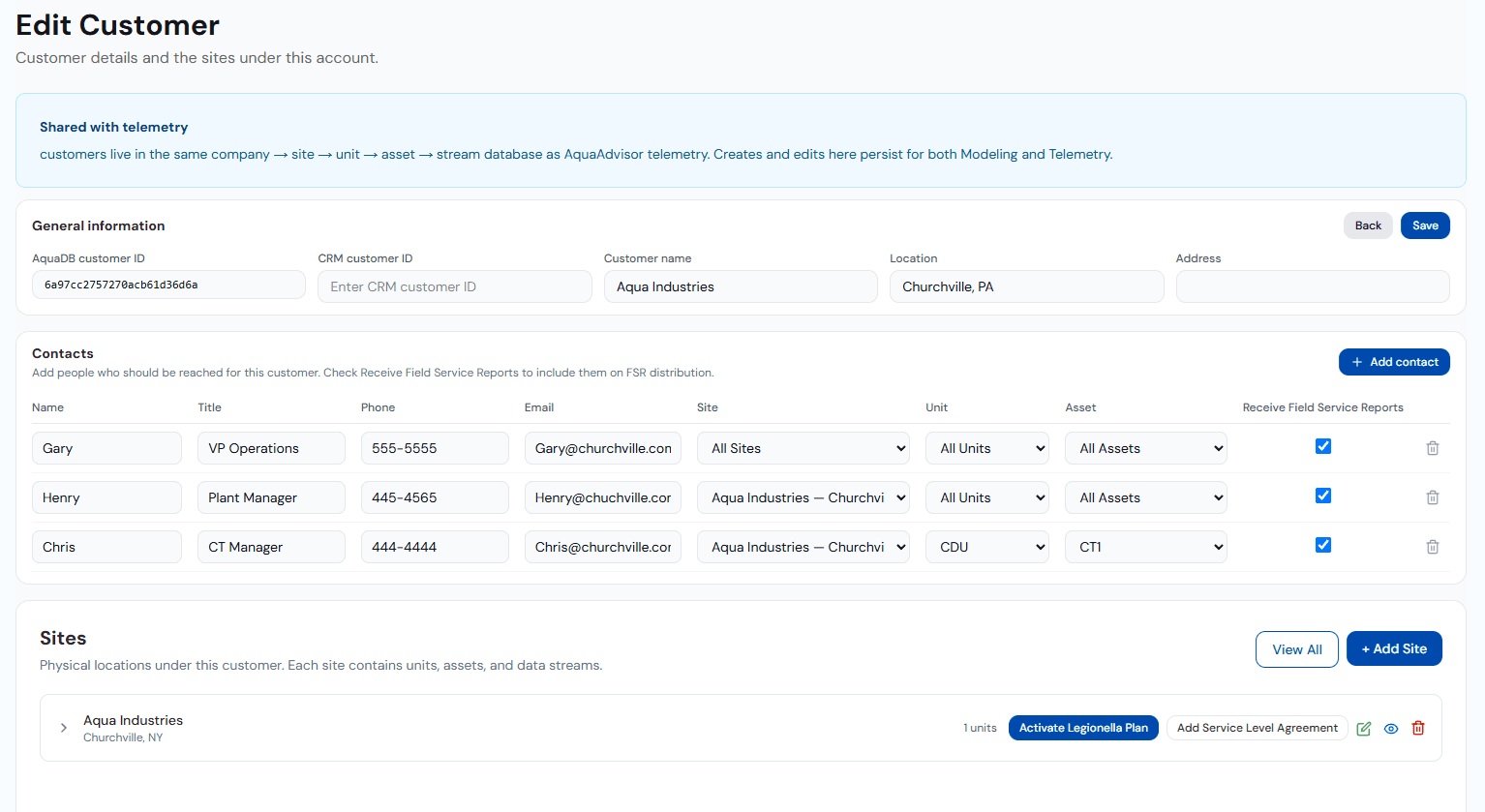
One customer record for reports, models, and telemetry
One hierarchy
Company → Site → Unit → Asset → Stream, shared with telemetry. One edit updates modeling and monitoring.
CRM customer ID
Each account carries its CRM identifier so records line up across systems.
Report distribution by contact
Contacts scoped to a site, unit, or asset, with field service report delivery set per person.
Programs per site
Activate a Legionella plan or service level agreement directly from the customer record.
PROGRAMS AND CONTROL LIMITS
Programs and control limits drive every report
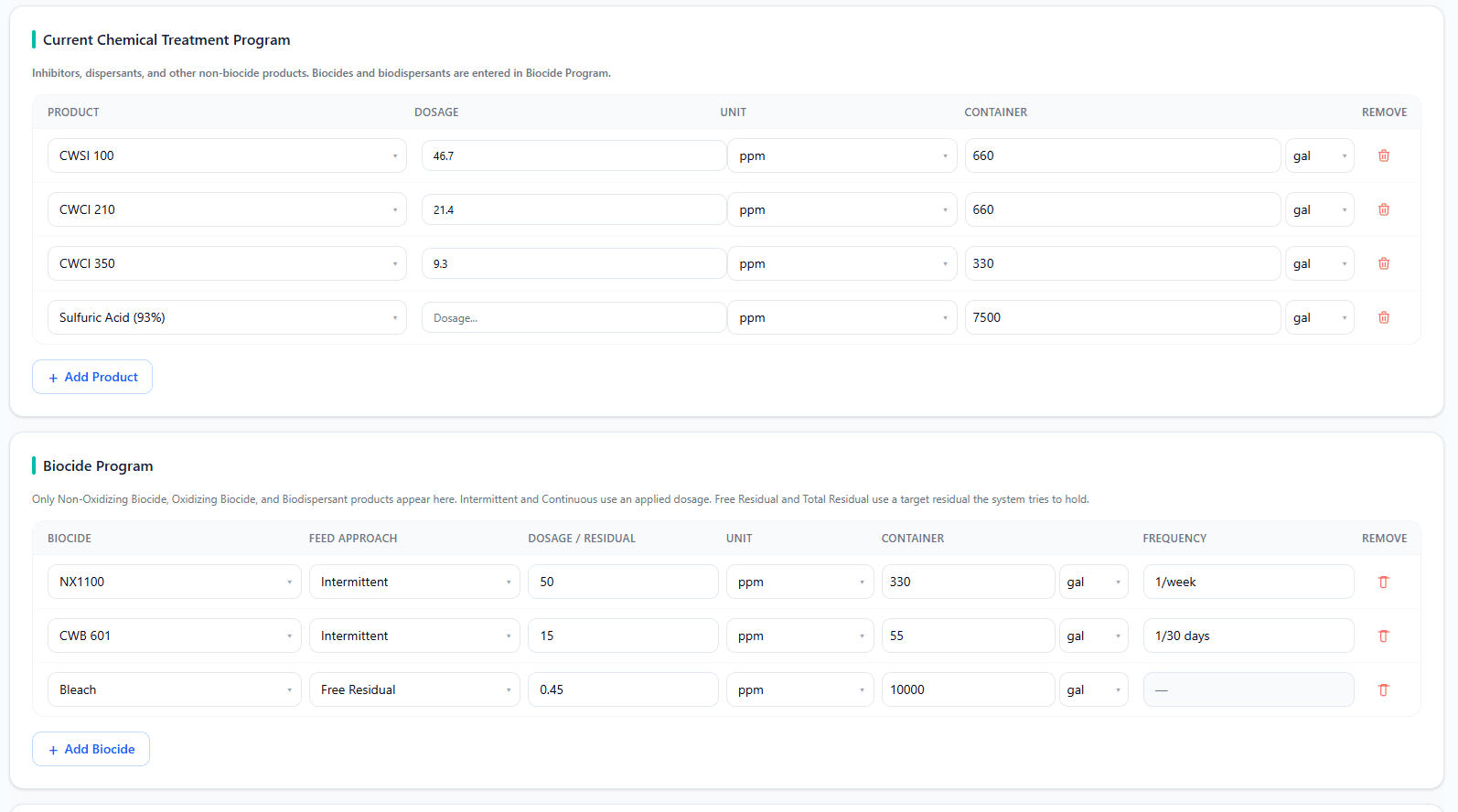
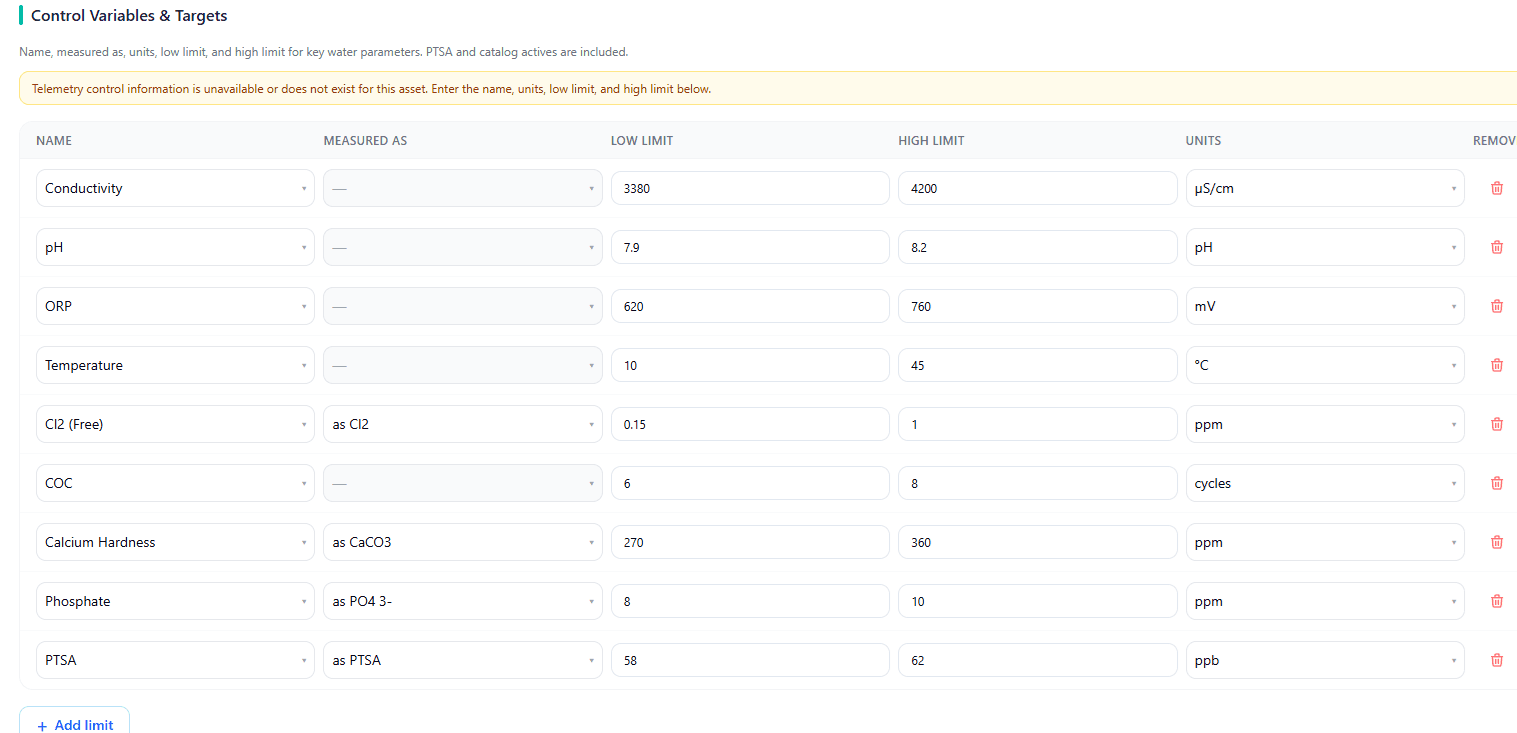
Entered once per asset. Every report reads them, so status and actions are consistent no matter which rep writes the report.
Treatment program
Products, dosage, and container size drive inventory use and run-out on every report.
Biocide program
Intermittent or residual feed, frequency, and demand by product.
Control limits
Low and high limits set green, amber, and red status and trigger recommended actions.
THE SERVICE DAY
What else has to happen before you leave the site
A water treatment service company does more than sample. AquaAdvisor covers the rest of the visit and the branch work that follows it.
Inventory monitoring and validation
Enter and validate on-hand inventory, pump setup and setpoints, and deliveries. Recommended reorders follow inventory and expected usage so the next visit does not start with an empty drum.
- On-hand counts against expected consumption
- Pump setpoints captured with the visit
- Deliveries recorded against the account
QR at every asset or datastream
Add a QR code to every asset or datastream location. Scan on arrival to capture site information, visit time and date, and related context — so the report is already attached to the right equipment.
Action items, Legionella, and contracts
Accept and close action items. Update Legionella tasks, samples, and results. Acknowledge service visits and Field Service–level contract tasks. Drive accountability and performance understanding between field, branch, and the customer.
Corrosion coupons without the wait
Beta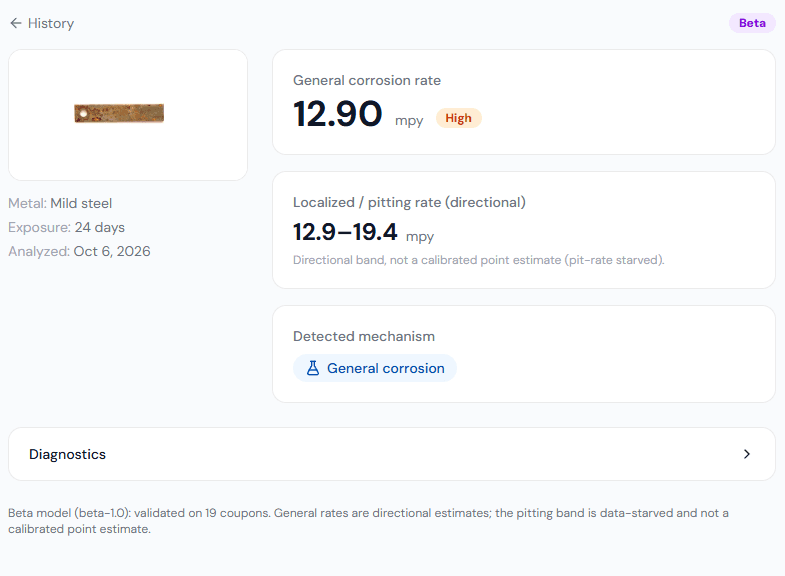
Demo tenant, not a customer site. Do not wait 30, 60, or 90 days for a corrosion-rate estimate. Photograph the coupon, enter metal and exposure time, and get a general rate in mpy, a localized pitting band, and the likely mechanism — alongside the first-principles corrosion model. Beta model, validated on 19 coupons; rates are directional.
Territory and assignment
Geolocate accounts and view representative assignment and territory so routing and coverage can be optimized — who owns the plant, who is nearest, and where the gaps are.
Calculators on site
Run independent calculators while you are at the asset. Chiller approach temperatures and a full health analysis are available in the field, along with cooling-tower performance, heat exchangers, closed loop, reverse osmosis, steam boiler, demineralization, water softener, filtration, unit conversion, and general utility calculators.
Analysis input from the visit
Upload water analysis, corrosion-coupon analysis, and deposit analysis as part of the same visit record that produces the service report.
Close-out that the branch can use
Digital signing, optional customer acknowledgement, email of PDFs and live reports, and automatic integration into telemetry — so account managers do not re-type the field sheet.
ACCOUNT CONTINUITY
When a rep leaves, the account history doesn't
Spreadsheets, local report files, and email history usually leave with the rep. In AquaAdvisor, everything is stored on the account.
Rep A
Rep B
Rep C
One continuous account record
- Assets and design data
- Treatment programs and limits
- Every field service report
- Coupons and analyses
- Legionella plans and evidence
- SLA terms and scores
- Contacts and distribution
- Original uploaded files
Ready on day one
A new rep opens the full history and asks Mike for a briefing.
Customer continuity
The customer sees the same report and the same actions.
Management view
Every account stays visible across branches and districts.
SUPPLIER / CLIENT HANDSHAKE
Document what you did — not only that you showed up.
The AquaAdvisor Supplier / Client Handshake workflow records program changes, actions, and value capture between your team and the customer. It is the operational record of the relationship: what changed, who agreed, and what it was worth — attached to the account, not lost in email.
HOW IT WORKS
Arrive, capture, close, hand off
The same visit record feeds the report, telemetry, CRM, and the QBR — instead of three systems that never quite match.
Identify the asset
Scan the QR at the asset or datastream location. Site, visit time, and assignment are already on the record.
Capture the work
Upload field tests, coupon photos, inventory counts, pump setpoints, and deliveries. Manual entry remains available when an image is not.
Generate the report
Organization, interpretation, trend and risk APIs, and optional AI comments produce a branded engineering report. Review, sign, and send.
Close the loop
Email PDF or live report, write into telemetry, forward to your CRM, update action items and Legionella tasks, and record the handshake for program changes and value.
OUTPUTS
What you get out
- Branded field service reports — PDF and live — with digital signing and optional customer acknowledgement
- Inventory, deliveries, and pump setpoints reconciled to expected usage and reorder recommendations
- Visit records with QR-captured site, time, and asset identity
- Action items, Legionella task updates, and contract visit acknowledgement on one thread
- Handshake records for program changes, actions, and value capture
- Coupon-image corrosion estimates plus first-principles corrosion model output
- Territory view: geolocated accounts, representative assignment, and coverage
- Onsite calculator results attached to the visit and the asset
- Rep dashboard of overdue tasks and sites needing reports
- Original uploaded files kept with every record
WHO THIS IS FOR
Who this is for
- Field chemists who write reports, log inventory, and close visits at the asset
- Account managers who own customers, sites, programs, and the handshake with the plant
- Branch operations leads who assign territory, track visits, and need a standard report every time
- Technical support who review field work, coupons, and asset health without waiting for the next lab cycle
RELATED
Related capabilities
Telemetry
Visit data writes into the same asset-scoped streams you monitor.
Legionella program
Tasks, samples, and results updated as part of the visit, not a separate binder.
Contract management
Visits, deliveries, and KPIs against the agreement you sold.
AI layer
Suggested comments and risk language on a solved chemistry state.
Analysis Lab
Engineering calculators for every application.
Integrations
CRM, ERP, plant data, and lab systems.
Walk a real visit with an engineer.
Bring a field sheet or a coupon photo. We will generate the report and the handshake live — no slide deck required.